Best IPTV Reseller Panel 2026 — Launch Your IPTV Business with The Television Club

Start a profitable IPTV business in 2026 with the The Television Club IPTV Reseller Program, one of the leading IPTV reseller panel providers trusted across the USA, UK, and Canada. Manage thousands of live TV channelsVOD movies, and premium series with a powerful, easy-to-use reseller dashboard.

The Television Club reseller panel offers automated tools for account management, billing, and sub-reseller control, providing full scalability. Sell monthly or yearly subscriptions, stream in 4K, access global content, and grow your brand with The Television Club white-label solutions. Launch your IPTV subscription business today and enjoy recurring revenue with a reliable IPTV reseller service in 2026.

Comprehensive IPTV Reseller Control Panel 2026 – Manage Your IPTV Business Easily

Our The Television Club IPTV reseller panel lets you manage accounts, monitor connections, and track activity logs in real-time, streamlining your IPTV business in 2026.

Experience IPTV Service with Free Trial – Test Before You Resell

At The Television Club, resellers can offer free IPTV trials so clients can explore live TV channels, movies, and series risk-free. This boosts trust, conversions, and positions your IPTV business 2026 as a top choice.

Premium IPTV Streaming Quality – 4K, FHD, HD & SD

At The Television Club, enjoy thousands of live TV channels, movies, and series in 4K, HD with smooth, buffer-free playback. Our IPTV packages 2026 support multiple devices, helping resellers grow their IPTV business.

Reseller Plans 2026

50 Credits

Reseller

$ 100
  • Technical Support 24X7
  • Your Own Fully controlled Panel
  • Add Unlimited Sub Resellers
  • Fully Automated System
  • Activate Sub from your credit at any time
  • Service Works on all devices
  • Add credit to your reseller account at any time.
  • Ability to provide 24H free trials.
  • Professional Support.
  • NO IP lock Use Anywhere

100 Credits

Master Reseller

$ 180
  • Technical Support 24X7
  • Your Own Fully controlled Panel
  • Add Unlimited Sub Resellers
  • Fully Automated System
  • Activate Sub from your credit at any time
  • Service Works on all devices
  • Add credit to your reseller account at any time.
  • Ability to provide 24H free trials.
  • Professional Support.
  • NO IP lock Use Anywhere

200 Credits

Master Reseller

$ 350
  • Technical Support 24X7
  • Your Own Fully controlled Panel
  • Add Unlimited Sub Resellers
  • Fully Automated System
  • Activate Sub from your credit at any time
  • Service Works on all devices
  • Add credit to your reseller account at any time.
  • Ability to provide 24H free trials.
  • Professional Support.
  • NO IP lock Use Anywhere

Why 2026 Is the Best Year to Start an IPTV Reseller Business

The IPTV industry in 2026 continues to grow faster than ever, creating one of the most profitable online business models for digital entrepreneurs.
With millions of users switching from traditional cable TV to IPTV streaming platforms, the IPTV reseller business has become a smart investment for those who want recurring income and scalable profits.
If you’re searching for the best IPTV reseller panel providers 2026, understanding the current market trends is essential before starting your own business.

According to recent statistics, the IPTV market is expected to surpass $140 billion globally by 2025.
This growth is driven by the increasing demand for flexible streaming options, HD & 4K content, and affordable subscriptions.
Reseller programs such as The Television Club make it easier than ever to start a legal and sustainable IPTV business.

Understanding IPTV Reseller Panels and How They Work

An IPTV reseller panel is a dedicated control dashboard that allows you to manage your IPTV customers, subscriptions, billing, and renewals.
Instead of building your own streaming infrastructure, you can use a reliable provider’s panel to handle everything — from account creation to customer support.

A professional reseller IPTV panel gives you access to tools like automated billing, EPG integration, channel grouping, and live analytics.
These features help resellers operate efficiently while keeping their customers satisfied with uninterrupted service.

Key Features That Define the Best IPTV Reseller Panels 2026

When choosing from the top IPTV reseller panels 2026, focus on platforms that provide speed, uptime, and scalability.
Here are the features you should look for:

  • ✔️ 99.9% Uptime Guarantee — Stable servers ensure your clients enjoy buffer-free streaming.
  • ✔️ White-Label Reseller Support — Sell under your own brand with custom logos and domains.
  • ✔️ Multi-Device Compatibility — Works on Smart TVs, Firestick, MAG, Android, iOS, and more.
  • ✔️ Advanced Reseller Dashboard — Manage customers, credits, and renewals easily.
  • ✔️ Automatic Billing & Reports — Save time with automated subscription management.
  • ✔️ Affordable Wholesale Pricing — High margins for resellers with flexible packages.

Providers like The Television Club combine all these essential tools with global support and flexible pricing — making it the #1 choice for IPTV resellers in 2026.

Top IPTV Reseller Panel Providers 2026 — Ranked & Reviewed

1. The Television Club — Best IPTV Reseller Program 2026 (Editor’s Choice)

The Television Club stands out as the most trusted and advanced IPTV reseller provider in 2026.
It offers a powerful reseller panel that simplifies operations while maximizing profits.
With 20,000+ live channels and 50,000+ VOD titles, it gives resellers a massive content library covering sports, movies, series, and international networks.

The Television Club’s reseller program includes:

  • 💠 99.9% uptime with enterprise-level servers
  • 💠 24/7 multilingual reseller support
  • 💠 Automated billing and API integration
  • 💠 White-label branding for resellers
  • 💠 Flexible pricing with high profit margins
  • 💠 Access from any location (No IP Lock)

The Television Club also provides free reseller training and promotional materials, helping new resellers quickly scale their IPTV businesses across the USA, UK, and Europe.

2. Stream Panel Pro — Simple and Affordable IPTV Reseller Platform

Stream Panel Pro is known for its user-friendly dashboard and low entry cost.
It’s suitable for beginners who want to learn the IPTV reseller business without heavy investment.

While it lacks some premium features found in The Television Club, it remains a good choice for small-scale operations.
However, for long-term business stability, upgrading to a robust platform like The Television Club is recommended.

3. IPTVPanel Master — Balanced Choice for Mid-Level Resellers

IPTV Panel Master offers a decent balance between price and functionality.
It supports moderate traffic and provides essential reseller tools such as customer management, account creation, and subscription monitoring.
However, compared to The Television Club reseller platform, its customization options and support quality are limited.

How to Choose the Right IPTV Reseller Provider in 2026

When evaluating the best IPTV reseller panel providers 2026, consider the following factors:

  • Uptime and Server Quality — Ensure the provider maintains a 99.9% uptime record.
  • Channel Variety — A large content library helps attract and retain more clients.
  • Pricing and Profit Margin — Look for transparent wholesale pricing.
  • Customer Support — Choose providers with 24/7 live support.
  • Scalability — Select a panel that can handle rapid business growth.

Why The Television Club Leads the IPTV Reseller Market in 2026

The Television Club has earned the top position among IPTV reseller programs due to its unmatched reliability and advanced reseller tools.
Its high-speed servers, responsive support, and flexible reseller system empower individuals and small businesses to start and scale IPTV ventures without technical complexity.

Unlike many budget providers, The Television Club ensures professional uptime monitoring, HD and 4K quality streams, and a reseller dashboard designed for business growth.
Whether you serve local clients in the USA, UK, or Canada, or run a global IPTV service, The Television Club provides everything you need under one platform.

Benefits of Joining the The Television Club IPTV Reseller Program

  • ✅ Access to 20,000+ channels and 50,000+ VODs
  • ✅ Create and manage customer accounts instantly
  • ✅ Offer flexible pricing with monthly or yearly plans
  • ✅ Build your own IPTV brand using white-label features
  • ✅ Enjoy stable streaming and advanced analytics

Step-by-Step: How to Start Your IPTV Reseller Business

Starting your IPTV reseller business in 2025 is simple with The Television Club:

  1. 🔹 Register on the official The Television Club reseller portal.
  2. 🔹 Choose a Reseller Package that fits your goals and budget.
  3. 🔹 Access Your Reseller Dashboard and start creating customer accounts.
  4. 🔹 Promote Your IPTV Services across social media, websites, and local markets.
  5. 🔹 Earn Profits as customers renew their subscriptions monthly.

Conclusion — Build Your Profitable IPTV Reseller Business with The Television Club

The IPTV market in 2026 offers huge opportunities for entrepreneurs ready to invest in the right platform.
By partnering with The Television Club IPTV Reseller Program, you gain access to industry-leading tools, top-tier streaming quality, and a business model built for consistent growth.

Don’t wait for the competition to take over — join The Television Club Reseller Program today and start earning from one of the fastest-growing digital businesses in the world.
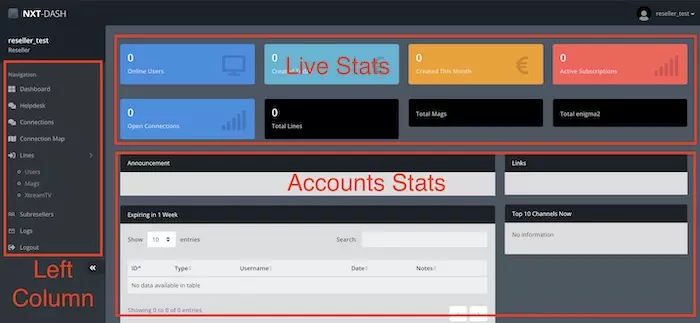
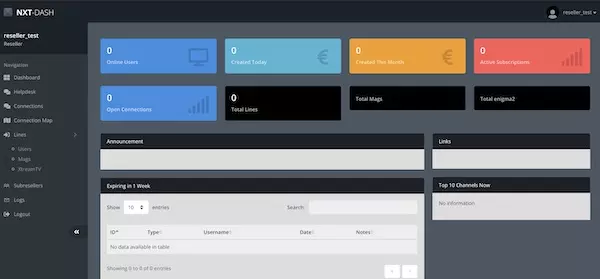
Dashboard blocks: Live stats, Account stats and Left column navigation – the three main sections of the IPTV reseller panel.

Understanding the main dashboard sections

The dashboard is organized into three core blocks that give resellers immediate control and visibility: monitoring tools (real-time stats), quick access sections (left column menu) and account performance (usage & expiry insights). This layout helps you manage accounts quickly and spot issues before they impact customers.

  • Live stats: active users, total connections per plan and currently created accounts.
  • Account stats: accounts near expiry, top 10 channels, and admin notifications.
  • Left column: the primary navigation for Lines, Connections, Subresellers, Logs and Credit tools.

The left column contains the main functions used daily — from creating trial lines and paid subscriptions to reviewing logs and managing subresellers. Mastering these three blocks will make running your IPTV reseller business efficient and scalable.

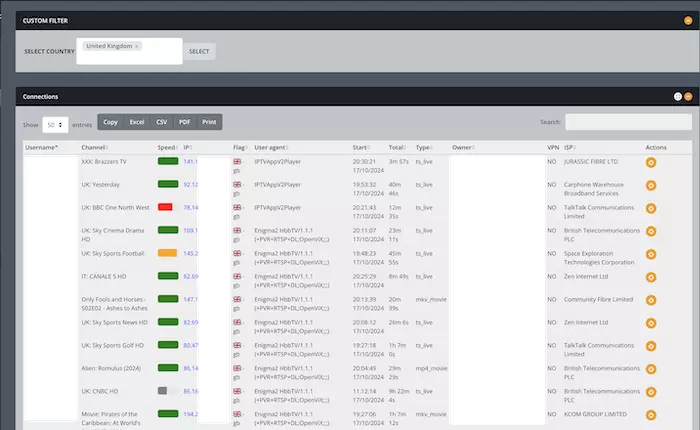
Live Connections Monitoring – View active users, device types, IP addresses, connection quality, and viewer activity in real time.

Monitoring the Connected Users in the IPTV Reseller Panel

The Connections section provides a real-time overview of every active user connected to your IPTV service. By clicking Connections from the left column, resellers can monitor viewer activity, connection stability, device information, and even take quick actions such as kicking stuck users. You can also filter connected users by country to see activity in specific regions.

This page is especially useful for monitoring account abuse, troubleshooting customer issues, and understanding which devices or apps your customers use most. You can also export all connection data to CSV or Excel for reporting and analysis.

Details Available in the Connections Page

  • Account Username – The line or account currently connected.
  • Channel Being Watched – Useful to see popular channels in real-time.
  • Speed (Connection Quality) – Measures connection stability between the user and the IPTV servers.
  • User IP Address – Identifies the customer’s internet source.
  • Country Flag – Shows the user’s location based on IP.
  • User Agent – Device/app used (e.g., Firestick, Smart TV, Android, iOS).
  • Start Time – When the viewer began watching.
  • Total Viewing Duration – Session duration in hours/minutes.
  • Stream Type – Formats like MPEGTS or HLS.
  • Owner – Whether the user belongs to you or to a subreseller.
  • VPN Detection – Shows if the customer is using a VPN.
  • ISP (Internet Service Provider) – Helps identify routing issues.
  • Kicking the User – Fixes “stuck” accounts that can’t reconnect.

Additional tools include copying table data, exporting as CSV/Excel, and using the search bar to quickly locate a specific username or connection.

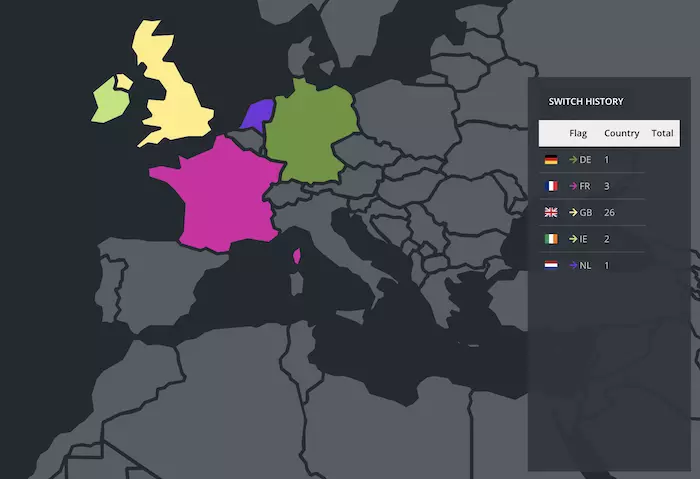
Connection Map – Visualize the geographic origin of your IPTV users with region-specific colors and real-time data.

Clients’ Connection Origin in the IPTV Reseller Panel

Curious to know where your users are connecting from? The Connection Map feature provides a worldwide visual representation of all active connections. Each country is assigned a distinctive color, and the number of connected clients from each region is displayed in a table for easy reference.

This feature is invaluable for marketing purposes, helping you identify high-performing regions. By knowing which countries generate the most clients, you can focus your promotions and optimize your revenue effectively.

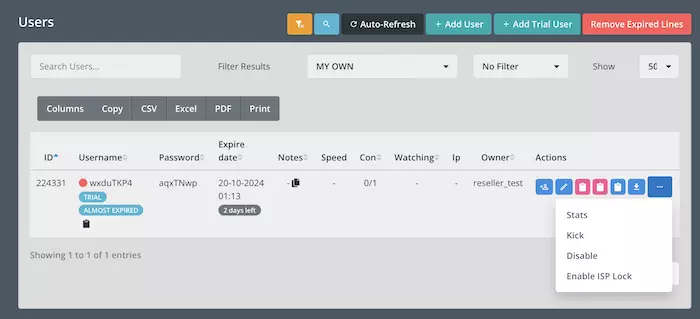
Streaming Lines Overview – Manage paid and trial IPTV accounts, auto-refresh, and export user lists.

How the Lines Section Works in the IPTV Panel

The Lines Section is the most crucial part of the IPTV panel as it handles all account management. Here, you can create and manage your streaming lines, such as M3U URLs. This section is located under Lines > Users and provides a detailed overview of all accounts.

Top buttons on the overview page include:

  • Yellow-ish button: Shows all users, including yours and subresellers.
  • Magnifier button: Zooms into the panel for better visibility.
  • Auto-refresh: Updates client data in the list every few seconds.
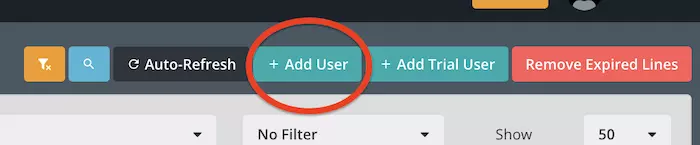
  • Add User: Create paid IPTV accounts consuming credits.
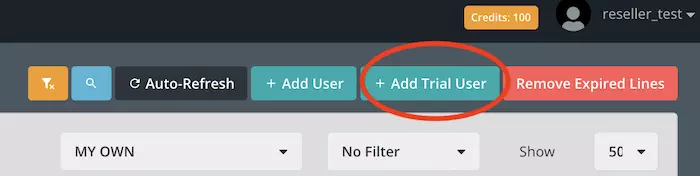
  • Add Trial User: Create free trial accounts.
  • Remove Expired Lines: Deletes expired users automatically.


The Search field allows you to find specific usernames, and Filtering Results lets you sort accounts based on creator or account condition (expired, trial, etc.). You can also export the list as a CSV, Excel sheet, or PDF for offline management.

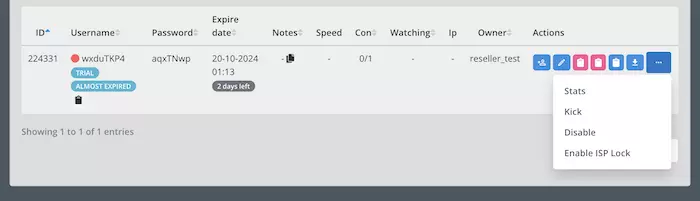
Example of a trial streaming line on the IPTV panel, showing control buttons like Extend, Edit, Copy M3U, Download, Stats, Kick, Disable, and ISP Lock.

Managing Streaming Accounts on the IPTV Panel

In this example, a streaming line has been created as a Trial account. Since it is near expiration, a tag displays Almost Expired. Other columns show account details clearly.

Control buttons (left to right):

  • Human icon +: Extend account from Trial to Paid.
  • Pen icon: Edit account details.
  • Pink icon: Copy M3U URL to clipboard.
  • Second Pink icon: Copy M3U_Plus URL with all categories & program icons.
  • Blue icon: Copy EPG URL to clipboard.
  • Download List: Export full URL extension playlist for devices like E2 or rare devices.
  • Stats: View channels watched by the client.
  • Kick: Disconnect the client session.
  • Disable: Block the account.
  • ISP Lock: Restrict the account to the first ISP used.


Understanding these buttons and fields allows you to efficiently manage trial and paid IPTV accounts within the panel.

Creating an IPTV Trial Streaming Line

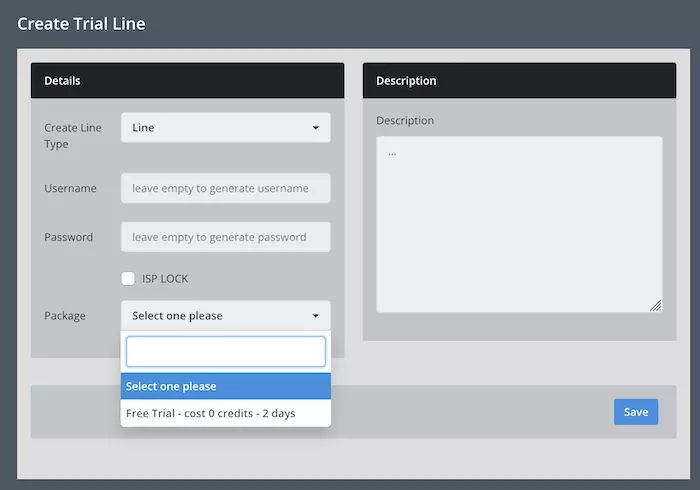
From the overview page, click the “Add Trial User” button at the top of the IPTV panel.
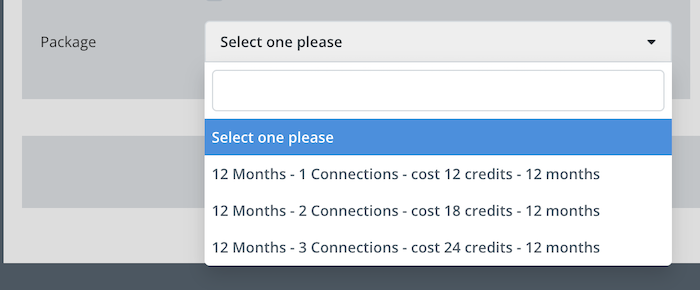
Choose “Select One Please” in front of the package. The IPTV trial package is 2 days long and free of charge.
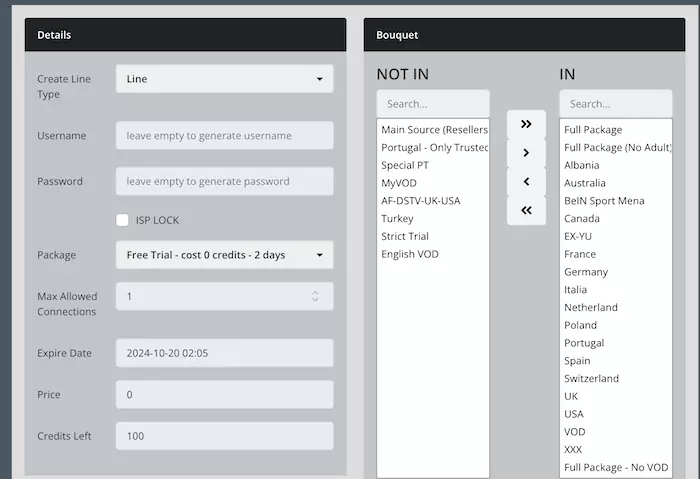
After selecting the package, assign channel bouquets to the account. The IN column includes channels in the playlist. Credit calculation and expiration date appear on the left.
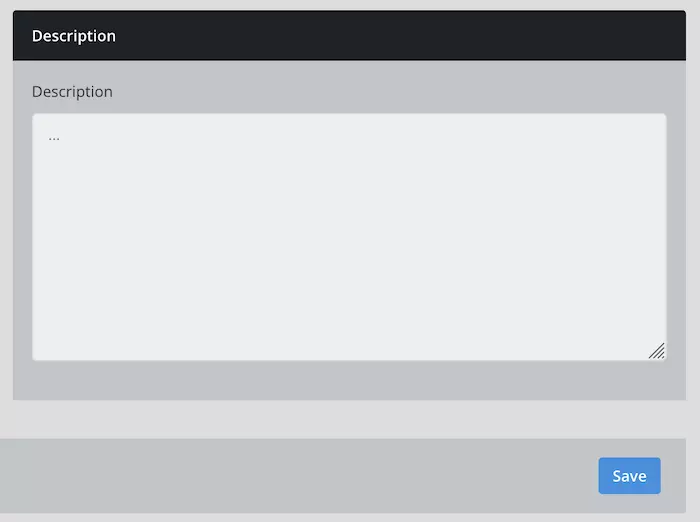
Add a description for the account to track and search lines later. Once ready, click Save.
The trial account is created and ready for use. Description added for future reference.

Creating a Paid Line on the Panel

From the top of the dashboard, click “Add User” to create a paid IPTV account.
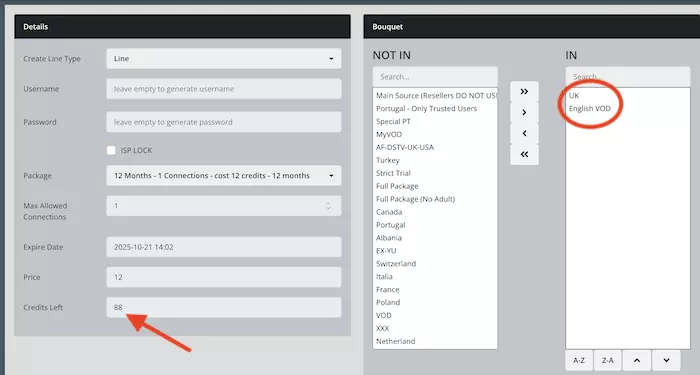
In the Package section, select your desired plan. Here we select “12 Months 1 Connection” for demonstration.
Assign channel bouquets for the paid line. In this example, UK channels plus English VOD (Movies and Series) are selected. Credits are consumed automatically.
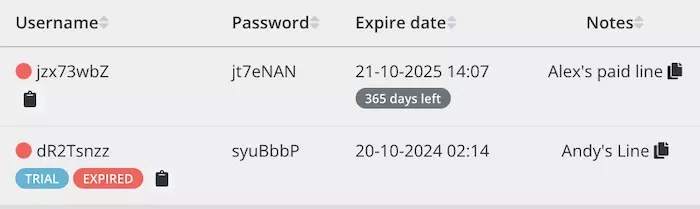
The paid line is created and ready. Notes can be added, and the Copy button lets you copy account details for messaging clients.

How to Create and Manage IPTV Subresellers on IPTV Panel

The importance of recruiting resellers: I always encourage clients to focus on this part, which I call The Money Making Machine. When you create and manage single users, that’s your job. But when you recruit your own resellers who manage their users and bring you revenue, that’s your business. You should focus more on the second part for efficiency.

For example, imagine you have 100 single users. You would need to manage each one individually for purchases, renewals, and support. Now, if you have 1 distributor with 100 users, the reseller handles everything for their clients while purchasing credits from you. You receive issues from one person, not 100, making management much easier.

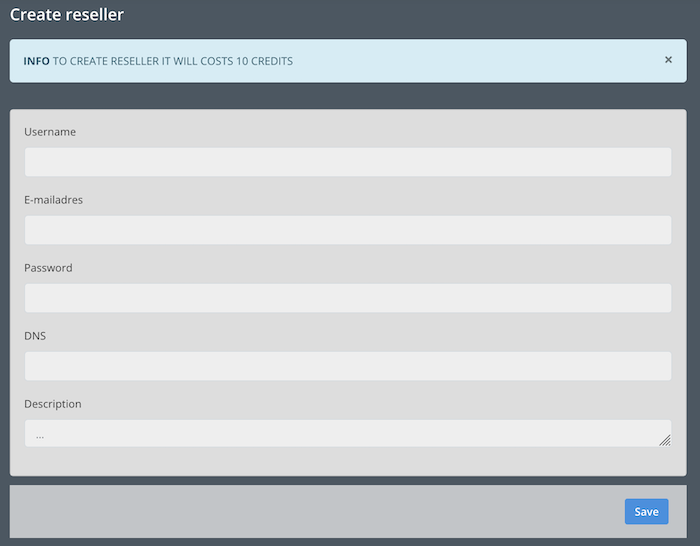
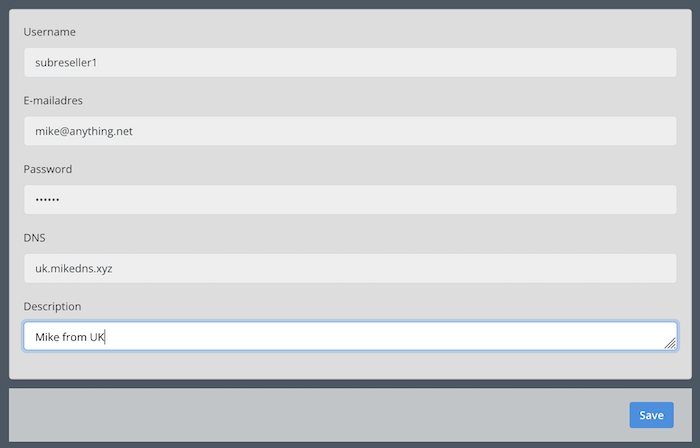
From the left column, open the Subreseller menu and click “Add”. Fill in details like Username, Password, Email, and Description. Assign a DNS address for the subreseller to use their own domain or sub-domain.

Assigning a DNS ensures your subresellers are not affected by any issues with your domain. For example, if your address gets blocked or leaked, your subreseller’s users remain unaffected. Likewise, if your subreseller has their own DNS, you are safe from their domain issues. Additionally, you can take backups, migrate accounts to a new provider, and continue operations seamlessly.

Note: Whenever you add a DNS to your subreseller, inform your provider to receive proper setup steps and IP address assignments.

Creating and Managing Subresellers on IPTV Panel

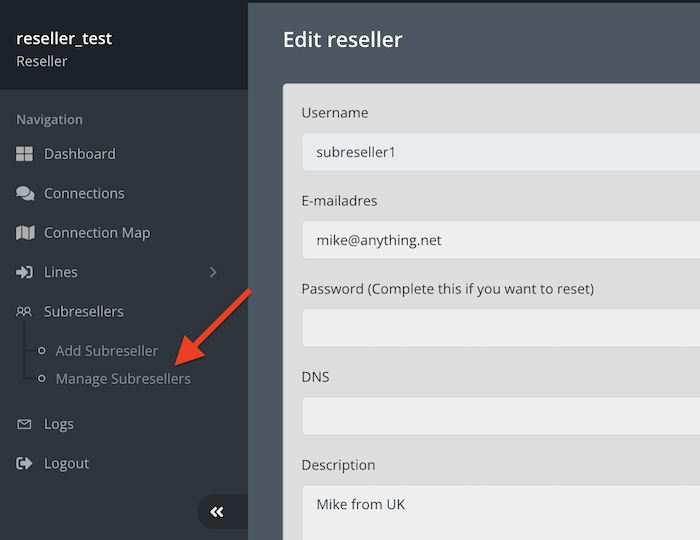
Example subreseller Mike has been added with his sub-domain uk.mikedns.xyz. The core server IP was assigned to this DNS. Follow the same steps when adding your own subresellers and contact support for proper IP assignment.
Once the account is ready, click “Manage Subresellers” to open the overview page.
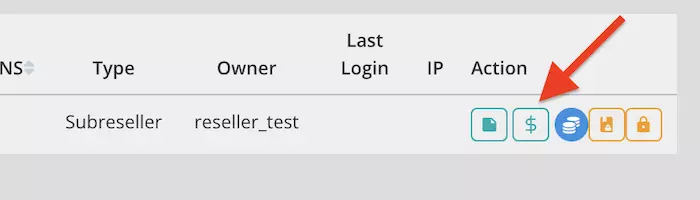
Overview page with 5 buttons: Edit, Add Credit ($), Profit System, Disable access, and Total Block (disables reseller and their lines).
From the subreseller overview page, click the dollar sign to add credits.
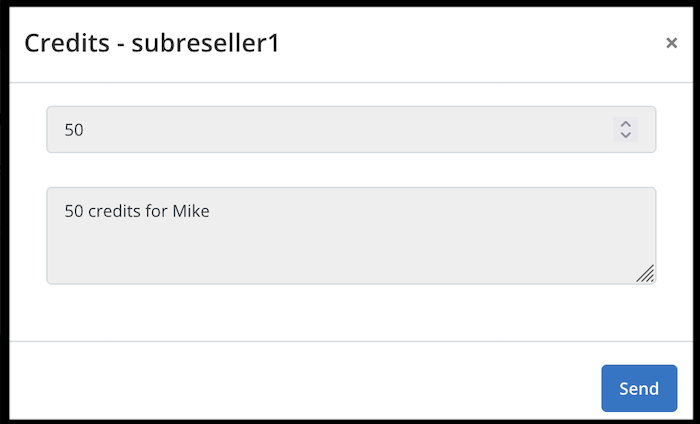
Add the desired amount of credits (e.g., 50) and write a note, then click Send.
Subreseller has received the credits and can now use them.

Using Profit System to Apply Commission Rates

The Profit System allows you to add extra rates on credit prices to earn commissions from your subresellers. Log into your dashboard, select Manage Subresellers, and click the blue button next to the reseller name. Add the percentage to apply on their credit prices and click Add. Manual edits are also possible. Finally, click Save.

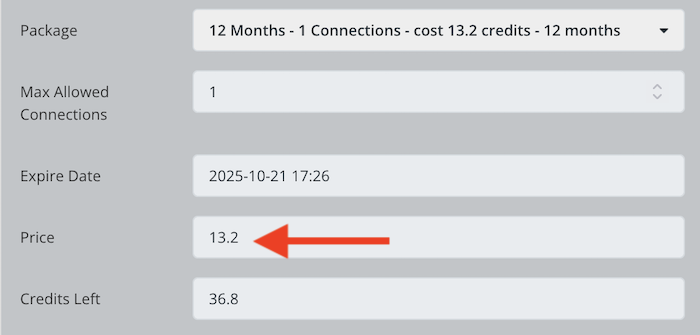
The same 12-month 1 connection plan now costs 13.2 credits instead of 12, reflecting a 10% commission added via Profit System.

IPTV Panel Logs

Keeping track of your panel activity is important for auditing and troubleshooting. The Logs section contains three submenus:

Activity Log shows actions taken by you or your sub-users with date, time, user, and action details.
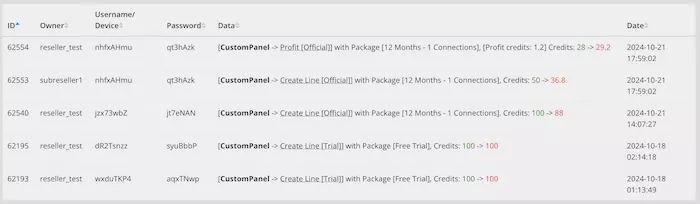
Credit Log shows the process of credit addition, whether from you or your subreseller.
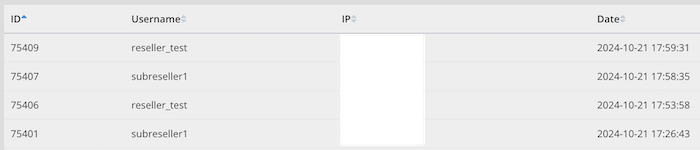
Login Log displays IP addresses and login times for admin, owner, and retailers.

This tutorial serves as a comprehensive guide to managing subresellers, credits, profit system, and monitoring logs on your IPTV panel. For any questions, contact support anytime.

Frequently Asked Questions (FAQ)

You can customize the color, shadow, style, text, title, etc of your accordion on your WordPress website using accordion widget from Elementskit addons for Elementor.

You can customize the color, shadow, style, text, title, etc of your accordion on your WordPress website using accordion widget from Elementskit addons for Elementor.

You can customize the color, shadow, style, text, title, etc of your accordion on your WordPress website using accordion widget from Elementskit addons for Elementor.

You can customize the color, shadow, style, text, title, etc of your accordion on your WordPress website using accordion widget from Elementskit addons for Elementor.

You can customize the color, shadow, style, text, title, etc of your accordion on your WordPress website using accordion widget from Elementskit addons for Elementor.